Free MySQL Recovery Software

DBRECOVER for MySQL

Free MySQL/InnoDB database recovery software. Extract data from corrupted .ibd files, damaged ibdata1, and crashed MySQL instances. Recover from ransomware attacks and accidental data loss without purchasing a license.

Free software, free to use. No Stripe checkout, no MySQL license purchase, and no license key is required for DBRECOVER for MySQL.
Free Software— free to use, no license purchase required
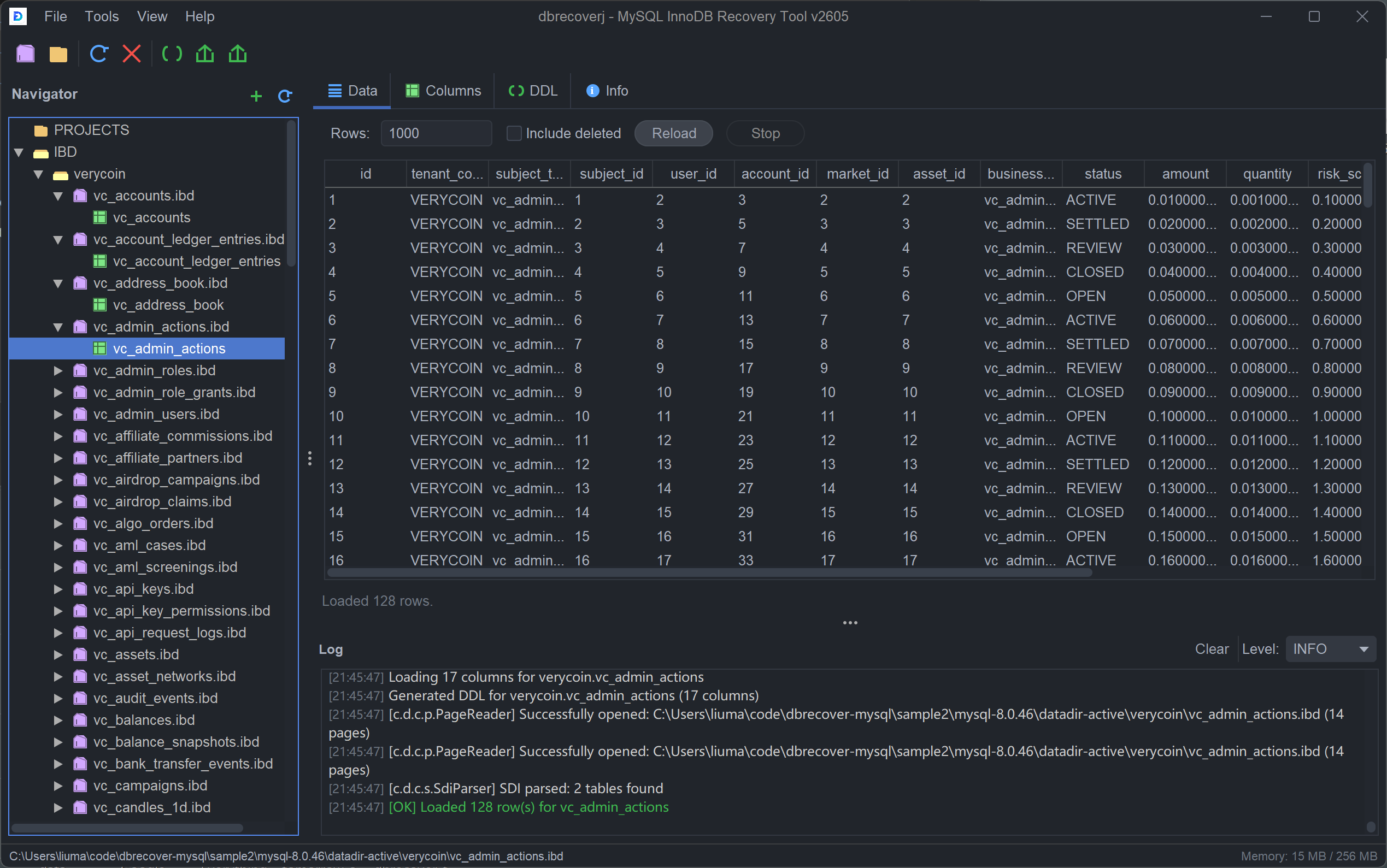
DBRECOVER for MySQL v2605 showing recovered InnoDB table data, columns, DDL, and log output
DBRECOVER for MySQL v2605 opens .ibd files directly, previews recovered rows, shows columns and DDL, and exports locally.

Handle InnoDB Corruption

When MySQL crashes with InnoDB corruption errors and traditional recovery fails, DBRECOVER extracts data directly from the storage engine files.

  • Page Corruption Recover from "Database page corruption on disk" errors
  • Log Sequence Errors Handle "log sequence number is in the future" issues
  • Tablespace Errors Recover from "trying to access page number outside the tablespace"
  • Crash Recovery Failed Extract data when InnoDB crash recovery fails
InnoDB Corruption - GUI Recovery Steps
-- MySQL fails to start with corruption [ERROR] InnoDB: Database page corruption on disk [ERROR] InnoDB: Page [page id: space=5, page number=127] [ERROR] InnoDB: Unable to read page -- Use DBRECOVER GUI to recover: Step 1: Launch DBRECOVER for MySQL Step 2: Click "Open IBD File" Step 3: Select corrupted orders.ibd file Step 4: View recovery analysis results Step 5: Click "Export" to save data ✓ 523,847 of 530,000 rows recovered!

MySQL Recovery Features

DBRECOVER for MySQL provides comprehensive tools for data extraction from InnoDB tablespaces without requiring a running MySQL instance.

  • Direct .ibd File Access Read data directly from individual tablespace files
  • ibdata1 Recovery Extract data from shared system tablespace
  • Schema Detection Automatically detect table schema from .frm files or data pages
  • Version Support Support MySQL 5.1 through 8.0 (InnoDB engine)
Schema Detection - orders.ibd
Detected Columns
TABLE STRUCTURE 5 columns detected
Column Type Size Null
idBIGINT8NO
customer_idINT4NO
order_dateDATETIME8YES
✓ Schema auto-detected Ready to recover

Ransomware & Disaster Recovery

Ransomware attacks and catastrophic failures don't have to mean permanent data loss. DBRECOVER can help extract data from partially damaged database files.

  • Partial Encryption Recover unencrypted portions of ransomware-attacked files
  • DROP DATABASE Recovery Recover accidentally dropped databases from disk
  • TRUNCATE Recovery Attempt to recover truncated table data
  • Hardware Failure Extract data from partially readable storage
DROP DATABASE Recovery - GUI Steps
-- Disaster: Database was dropped! mysql> DROP DATABASE production; Query OK, 47 rows affected -- Files might still be on disk -- Use DBRECOVER GUI immediately! Step 1: Launch DBRECOVER for MySQL Step 2: Click "Scan Directory" Step 3: Select /var/lib/mysql folder Step 4: View found deleted .ibd files Step 5: Select files → "Recover" ✓ Recovered 3 tables with 1.2M rows

Recover Locally With Free Software

Use DBRECOVER for MySQL freely to inspect your own InnoDB files. Confirm table detection, row preview, schema reconstruction, and export readiness locally without uploading production data.

Free Recovery Flow

  • 1. Select files.ibd, ibdata1, or database directory
  • 2. Detect schema.frm files or page-level inference
  • 3. Preview rowsConfirm sample records locally
  • 4. Export dataWrite MYSQLDUMP-format SQL files

Sample Recovery Report

DatabaseMySQL 8.0 / InnoDB
FailurePage corruption on disk
Inputorders.ibd, customers.ibd
Detected43 tables
PreviewRows visible before export

What You Should See

The software should show detected tables, reconstructed columns, row previews, and any tables that require additional schema information.

  • No running serverDirect InnoDB file reading
  • Free exportMYSQLDUMP SQL files
Example Export Output
-- MYSQLDUMP export generated by DBRECOVER for MySQL CREATE TABLE `orders` ( `id` bigint NOT NULL, `customer_id` int NOT NULL, `total` decimal(10,2) DEFAULT NULL ); INSERT INTO `orders` VALUES (10001, 501, 1250.00), (10002, 782, 3500.00);
Anonymous Case

InnoDB Page Corruption

MySQL failed to start after page corruption errors. DBRECOVER read the .ibd files directly and exported visible rows to SQL.

Outcome: key tables exported for reload.

Anonymous Case

DROP DATABASE Incident

A database was dropped accidentally. Recovery focused on remaining filesystem artifacts and readable InnoDB pages.

Outcome: recoverable tables identified locally.

Anonymous Case

Ransomware Partial Damage

Some database files were partially encrypted. The preview showed which records remained readable and worth exporting.

Outcome: unencrypted rows verified locally.

Rescue Your MySQL Data Today

Download the free software and scan your corrupted InnoDB files. See exactly what data can be recovered and export it locally.